📚 This is Part 3 of 3 in the complete Raspberry Pi Cluster series
With your cluster assembled from Part 2, let's install and configure the software stack to get Hadoop and Spark running.
Create Passwordless SSH:
Create ssh config file /.ssh/config on your NameNode (ubuntu-pi-100000)
Host ubuntu-pi-100000
	HostName ubuntu-pi-100000
	User ubuntu
	IdentityFile ~/.ssh/hadoopuser
Host ubuntu-pi-010000
	HostName ubuntu-pi-010000
	User ubuntu
	IdentityFile ~/.ssh/hadoopuser
Host ubuntu-pi-001000
	HostName ubuntu-pi-001000
	User ubuntu
	IdentityFile ~/.ssh/hadoopuser
Host ubuntu-pi-000100
	HostName ubuntu-pi-000100
	User ubuntu
	IdentityFile ~/.ssh/hadoopuser
Host ubuntu-pi-000010
	HostName ubuntu-pi-000010
	User ubuntu
	IdentityFile ~/.ssh/hadoopuser
Host ubuntu-pi-000001
	HostName ubuntu-pi-000001
	User ubuntu
	IdentityFile ~/.ssh/hadoopuser
Create a ssh key for the cluster
Use the keygen on your NameNode.
sudo ssh-keygen -f ~/.ssh/sshkey_rsa -t rsa -P ""
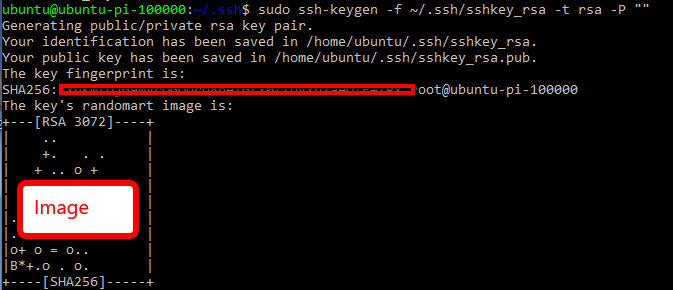
Change the owner of the files we just created
sudo chown ubuntu sshkey_rsa
sudo chown ubuntu sshkey_rsa.pub
Move the public key to authorized keys and copy the public and private key to all machines
I renamed my private key to hadoopuser. You will be prompted for passwords while doing the secure copy.
sudo mv ~/.ssh/sshkey_rsa ~/.ssh/hadoopuser

cat ~/.ssh/sshkey_rsa.pub >> ~/.ssh/authorized_keys

sudo cat ~/.ssh/sshkey_rsa.pub | ssh ubuntu-pi-010000 "cat >> ~/.ssh/authorized_keys"
scp ~/.ssh/hadoopuser ~/.ssh/config ubuntu-pi-010000:~/.ssh

sudo cat ~/.ssh/sshkey_rsa.pub | ssh ubuntu-pi-001000 "cat >> ~/.ssh/authorized_keys"
scp ~/.ssh/hadoopuser ~/.ssh/config ubuntu-pi-001000:~/.ssh

sudo cat ~/.ssh/sshkey_rsa.pub | ssh ubuntu-pi-000100 "cat >> ~/.ssh/authorized_keys"
scp ~/.ssh/hadoopuser ~/.ssh/config ubuntu-pi-000100:~/.ssh

sudo cat ~/.ssh/sshkey_rsa.pub | ssh ubuntu-pi-000010 "cat >> ~/.ssh/authorized_keys"
scp ~/.ssh/hadoopuser ~/.ssh/config ubuntu-pi-000010:~/.ssh

sudo cat ~/.ssh/sshkey_rsa.pub | ssh ubuntu-pi-000001 "cat >> ~/.ssh/authorized_keys"
scp ~/.ssh/hadoopuser ~/.ssh/config ubuntu-pi-000001:~/.ssh
Server updates, software downloads and installs:
Log on to the first pi for apt updates and upgrades
ssh ubuntu@ubuntu-pi-100000
sudo apt update
sudo apt -y upgrade
Now run these commands from the first node to update the other nodes.
ssh ubuntu@ubuntu-pi-010000 "sudo apt update && sudo apt -y upgrade"
ssh ubuntu@ubuntu-pi-001000 "sudo apt update && sudo apt -y upgrade"
ssh ubuntu@ubuntu-pi-000100 "sudo apt update && sudo apt -y upgrade"
ssh ubuntu@ubuntu-pi-000010 "sudo apt update && sudo apt -y upgrade"
ssh ubuntu@ubuntu-pi-000001 "sudo apt update && sudo apt -y upgrade"
Install basic networking tools
sudo apt -y install wireless-tools net-tools iw
Install Java : ssh onto each machine and install java.
https://openjdk.java.net/install/
sudo apt-get -y install openjdk-8-jdk
Install Hadoop
http://apache.mirrors.hoobly.com/hadoop/common/hadoop-2.10.0/hadoop-2.10.0.tar.gz
wget http://apache.mirrors.hoobly.com/hadoop/common/hadoop-2.10.0/hadoop-2.10.0.tar.gz -P ~/downloads
extract compressed hadoop file to /usr/local
rename the folder "hadoop"
sudo tar zxvf ~/downloads/hadoop-2* -C /usr/local
sudo mv /usr/local/hadoop-* /usr/local/hadoop
sudo chown -R ubuntu /usr/local/hadoop
Update Environment Variables on all Pi's
Open your ~/.bashrc file in you favorite editor. nano or vi. Add the following environment variables to the end
#Hadoop
export JAVA_HOME=/usr
export PATH=$PATH:$JAVA_HOME/bin
export HADOOP_HOME=/usr/local/hadoop
export PATH=$PATH:$HADOOP_HOME/bin
export HADOOP_CONF_DIR=/usr/local/hadoop/etc/hadoop
export HADOOP_PREFIX=$HADOOP_HOME
Reload profile on each Pi
. ~/.bashrc
NameNode Configuration - (ubuntu-pi-100000): Create a data directory for the NameNode
sudo mkdir -p $HADOOP_HOME/hadoop_data/hdfs/namenode
Update JAVA_HOME in /etc/hadoop/hadoop-env.sh

NameNode Configuration - core-site.xml
Modify the /usr/local/hadoopetc/hadoop/core-site.xml configuration file.
Update it with the Namenode HOSTNAME and static user:
/usr/local/hadoop/etc/hadoop/core-site.xml
                fs.defaultFS
                hdfs://ubuntu-pi-100000:9000


               hadoop.http.staticuser.user
               ubuntu
NameNode Configuration - hdfs-site.xml
Modify the /usr/local/hadoopetc/hadoop/hdfs-site.xml configuration file
        dfs.replication
        3


        dfs.permisions.enabled
        false


        dfs.namenode.name.dir
        file:///usr/local/hadoop/hadoop_data/hdfs/namenode


    dfs.secondary.http.address
    ubuntu-pi-010000:50090
NameNode Configuration - yarn-site.xml
Modify the usr/local/hadoop/etc/hadoop/yarn-site.xml configuration file
   nodemanager.recovery.enabled
   true


   yarn.resourcemanager.hostname
   ubuntu-pi-100000


    yarn.resourcemanager.scheduler.class
    org.apache.hadoop.yarn.server.resourcemanager.scheduler.fair.FairScheduler
NameNode Configuration - mapred-site.xml
        mapreduce.cluster.acls.enabled
        false


        mapreduce.jobhistory.address
        ubuntu-pi-100000:10020


        mapreduce.jobhistory.webapp.address
        ubuntu-pi-100000:19888


            mapreduce.framework.name
            yarn
NameNode Configuration - Add NameNode entry to Masters file
echo "ubuntu-pi-100000" >> $HADOOP_CONF_DIR/masters
Name Node Configuration - Specify workers in 'slaves' file. /hadoop/etc/hadoop/slaves
#create a new file with the first entry.
echo "ubuntu-pi-010000" > $HADOOP_CONF_DIR/slaves
#append the rest.
echo "ubuntu-pi-001000" >> $HADOOP_CONF_DIR/slaves
echo "ubuntu-pi-000100" >> $HADOOP_CONF_DIR/slaves
echo "ubuntu-pi-000010" >> $HADOOP_CONF_DIR/slaves
echo "ubuntu-pi-000001" >> $HADOOP_CONF_DIR/slaves
DataNode Configuration (ubuntu-pi-0xxxxxx) : Copy files from Namenode to worker nodes
Copy the configuration files hdfs-site.xml, core-site.xml, mapred-site.xml to the data nodes (ubuntu-pi-010000 : ubuntu-pi-00001).
scp $HADOOP_CONF_DIR/hdfs-site.xml ubuntu-pi-010000:$HADOOP_CONF_DIR
scp $HADOOP_CONF_DIR/hdfs-site.xml ubuntu-pi-001000:$HADOOP_CONF_DIR
scp $HADOOP_CONF_DIR/hdfs-site.xml ubuntu-pi-000100:$HADOOP_CONF_DIR
scp $HADOOP_CONF_DIR/hdfs-site.xml ubuntu-pi-000010:$HADOOP_CONF_DIR
scp $HADOOP_CONF_DIR/hdfs-site.xml ubuntu-pi-000001:$HADOOP_CONF_DIR
scp $HADOOP_CONF_DIR/core-site.xml ubuntu-pi-010000:$HADOOP_CONF_DIR
scp $HADOOP_CONF_DIR/core-site.xml ubuntu-pi-001000:$HADOOP_CONF_DIR
scp $HADOOP_CONF_DIR/core-site.xml ubuntu-pi-000100:$HADOOP_CONF_DIR
scp $HADOOP_CONF_DIR/core-site.xml ubuntu-pi-000010:$HADOOP_CONF_DIR
scp $HADOOP_CONF_DIR/core-site.xml ubuntu-pi-000001:$HADOOP_CONF_DIR
scp $HADOOP_CONF_DIR/mapred-site.xml ubuntu-pi-010000:$HADOOP_CONF_DIR
scp $HADOOP_CONF_DIR/mapred-site.xml ubuntu-pi-001000:$HADOOP_CONF_DIR
scp $HADOOP_CONF_DIR/mapred-site.xml ubuntu-pi-000100:$HADOOP_CONF_DIR
scp $HADOOP_CONF_DIR/mapred-site.xml ubuntu-pi-000010:$HADOOP_CONF_DIR
scp $HADOOP_CONF_DIR/mapred-site.xml ubuntu-pi-000001:$HADOOP_CONF_DIR
DataNode Configuration (ubuntu-pi-010000) : yarn-site.xml
ssh onto the first data node / worker.
ubuntu-pi-010000 and modify the yarn-site.xml configuration.
   yarn.resourcemanager.hostname
   ubuntu-pi-100000


   yarn.nodemanager.aux-services
   mapreduce_shuffle
Copy the yarn-site.xml and the hadoop-env.sh file to the other data nodes
scp $HADOOP_CONF_DIR/yarn-site.xml ubuntu-pi-001000:$HADOOP_CONF_DIR
scp $HADOOP_CONF_DIR/yarn-site.xml ubuntu-pi-000100:$HADOOP_CONF_DIR
scp $HADOOP_CONF_DIR/yarn-site.xml ubuntu-pi-000010:$HADOOP_CONF_DIR
scp $HADOOP_CONF_DIR/yarn-site.xml ubuntu-pi-000001:$HADOOP_CONF_DIR

scp $HADOOP_CONF_DIR/hadoop-env.sh ubuntu-pi-001000:$HADOOP_CONF_DIR
scp $HADOOP_CONF_DIR/hadoop-env.sh ubuntu-pi-000100:$HADOOP_CONF_DIR
scp $HADOOP_CONF_DIR/hadoop-env.sh ubuntu-pi-000010:$HADOOP_CONF_DIR
scp $HADOOP_CONF_DIR/hadoop-env.sh ubuntu-pi-000001:$HADOOP_CONF_DIR
Data Node Configuration (ubuntu-pi-010000) : Create Data Directories
#Run these from the first data node to create data directories on all data nodes.
sudo mkdir -p $HADOOP_HOME/hadoop_data/hdfs/datanode
sudo chown -R ubuntu $HADOOP_HOME

#creating remote data dirs
ssh ubuntu@ubuntu-pi-001000 "sudo mkdir -p ${HADOOP_HOME}/hadoop_data/hdfs/datanode && sudo chown -R ubuntu ${HADOOP_HOME}"
ssh ubuntu@ubuntu-pi-000100 "sudo mkdir -p ${HADOOP_HOME}/hadoop_data/hdfs/datanode && sudo chown -R ubuntu ${HADOOP_HOME}"
ssh ubuntu@ubuntu-pi-000010 "sudo mkdir -p ${HADOOP_HOME}/hadoop_data/hdfs/datanode && sudo chown -R ubuntu ${HADOOP_HOME}"
ssh ubuntu@ubuntu-pi-000001 "sudo mkdir -p ${HADOOP_HOME}/hadoop_data/hdfs/datanode && sudo chown -R ubuntu ${HADOOP_HOME}"
START HADOOP:
Format the Namenode, start the services and view the report : (ubuntu-pi-100000)
hdfs namenode -format
#Start Everything!@ (the start-all command is deprecated but still works as of 2.10)
#you could also use start-dfs.sh && start-yarn.sh
$HADOOP_HOME/sbin/start-all.sh
hdfs dfsadmin -report
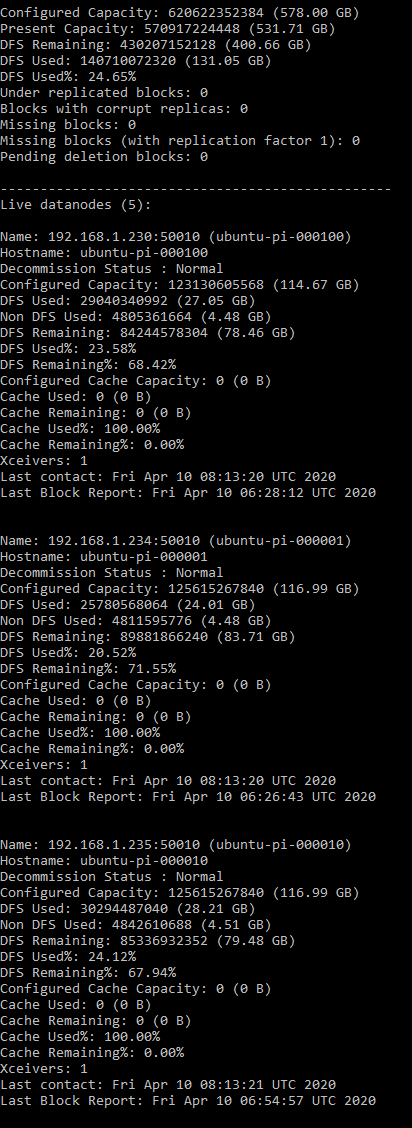
Check Java - Namenode ubuntu-pi-100000:
jps

Check Java - Data Node / Workers ubuntu-pi-010000:
jps

Check Hadoop UI (hdfs manager)
Navigate to the Hadoop UI: http://ubuntu-pi-100000:50070
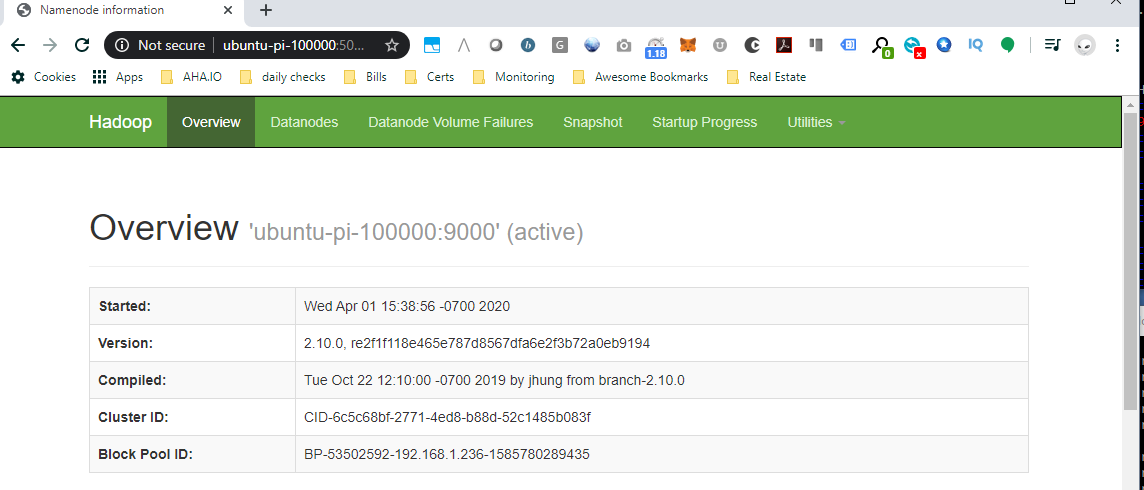
Check the resource manager (yarn ui)
Navigate to the Hadoop Cluster Metrics: http://ubuntu-pi-100000:8088/cluster?user.name=ubuntu
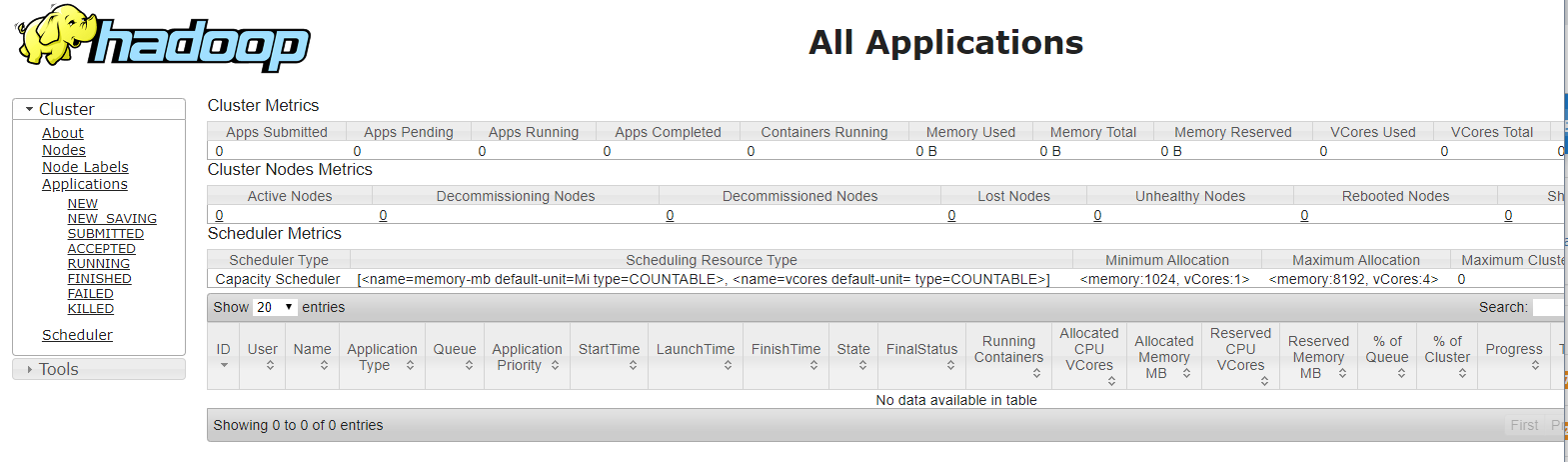
Test a map reduce job :
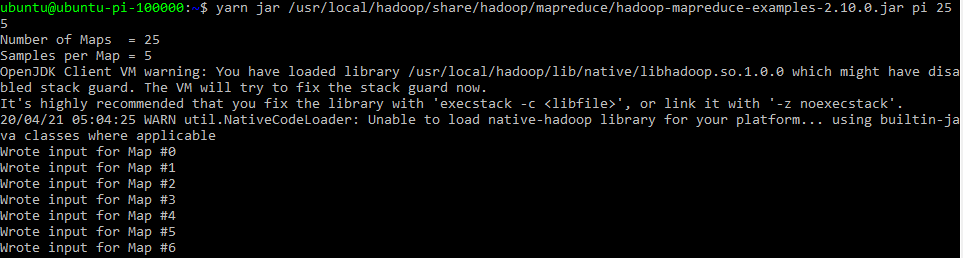
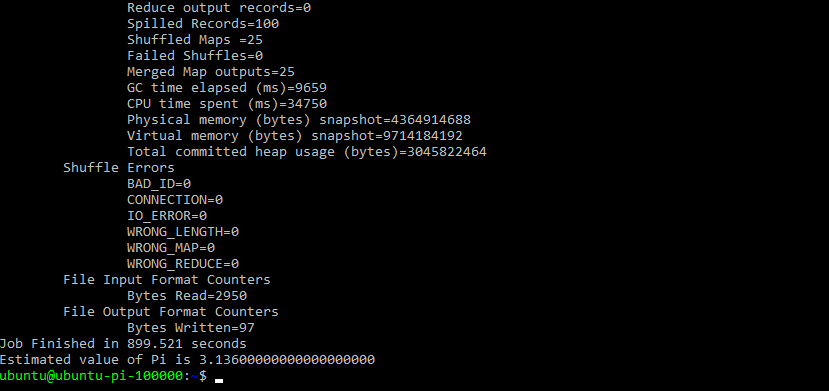
yarn jar /usr/local/hadoop/share/hadoop/mapreduce/hadoop-mapreduce-examples-2.10.0.jar pi 25 5
#or
hadoop jar /usr/local/hadoop/share/hadoop/mapreduce/hadoop-mapreduce-examples-2.10.0.jar pi 25 5
#useful hadoop commands:
#file System Check
hdfs fsck /
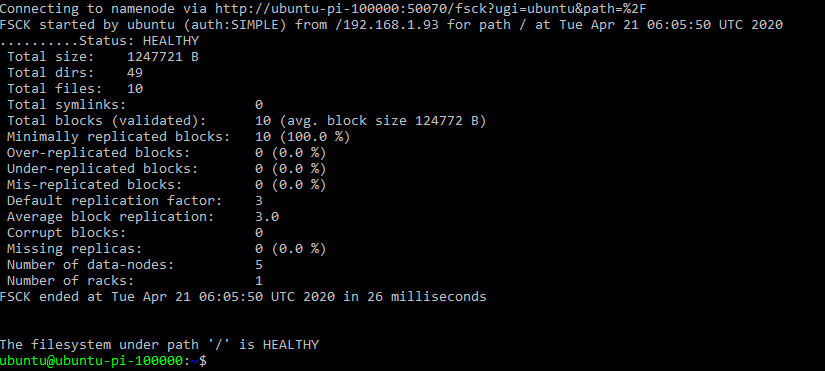
All Healthy.
Install hive:
http://www.apache.org/dyn/closer.cgi/hive/
wget https://downloads.apache.org/hive/hive-2.3.6/apache-hive-2.3.6-bin.tar.gz -P ~/downloads

#untar
sudo tar zxvf ~/downloads/apache-hive* -C /usr/local
#rename to "hive'
sudo mv /usr/local/apache-hive-2.3.6-bin/ /usr/local/hive
Update ~/.bashrc with environment variables
export HIVE_HOME=/usr/local/hive
export HIVE_CONF_HOME=$HIVE_HOME/bin
export PATH=$PATH:$HIVE_HOME/bin
export CLASSPATH=$CLASSPATH:$HIVE_HOME/lib/*:.
Edit the hive config file ($HIVE_HOME/bin/hive-config.sh). Tell hive where hadoop lives.
sudo nano $HIVE_HOME/bin/hive-config.sh
#add to the bottom of the file
export HADOOP_HOME=/usr/local/hadoop
Create and configure the /hive/conf/hive-site.xml file if it doesn't exist
I've added the connection data for a Mysql instance we will create in the next step.
Ensure your hive.metastore.warehouse.dir url points to your yarn/hadoop name node and that the port number is correct.
javax.jdo.option.ConnectionURL
jdbc:mysql://localhost:3306/hive?createDatabaseIfNotExist=true&useSSL=false
metadata is stored in a MySQL server


javax.jdo.option.ConnectionDriverName
com.mysql.jdbc.Driver
MySQL JDBC driver class


javax.jdo.option.ConnectionUserName
hive
user name for connecting to mysql server


javax.jdo.option.ConnectionPassword
hive
password for connecting to mysql server


hive.metastore.schema.verification
false


hive.metastore.warehouse.dir
hdfs://ubuntu-pi-100000:9000/user/hive/warehouse
Location of default database for the warehouse
Create directories on HDFS for hive
hadoop fs -mkdir /tmp
hadoop fs -mkdir -p /user/hive/warehouse
hadoop fs -chmod g+w /tmp
hadoop fs -chmod g+w /user/hive/warehouse
Setup MySQL as the hive Metastore
The hive Metastore holds table definitions. The data related to these table is spread across the hadoop file system.
Install MySQL
sudo apt install -y mysql-server
sudo systemctl start mysql
sudo systemctl status mysql

Create database for the hive metastore
mysql -u root
mysql> create database hive;
mysql> create user 'hive' identified by 'hive';
mysql> grant all on hive.* to hive;
mysql> flush privileges;
mysql> exit;

mysql -u hive -p

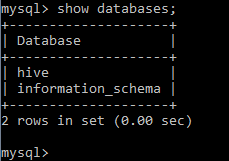
mysql> show databases;
download mysql-connector-java and add connector jar to the hive/libs directory
wget https://downloads.mysql.com/archives/get/p/3/file/mysql-connector-java-8.0.18.tar.gz
tar -xvf mysql-connector-java-8.0.18.tar.gz --wildcards --no-anchored '*.jar' -C ~/usr/local/hive/lib
#if available change metastore_db directory to temp, we're going to use MySql
mv /usr/local/hive/metastore_db /usr/local/hive/metastore_db.tmp
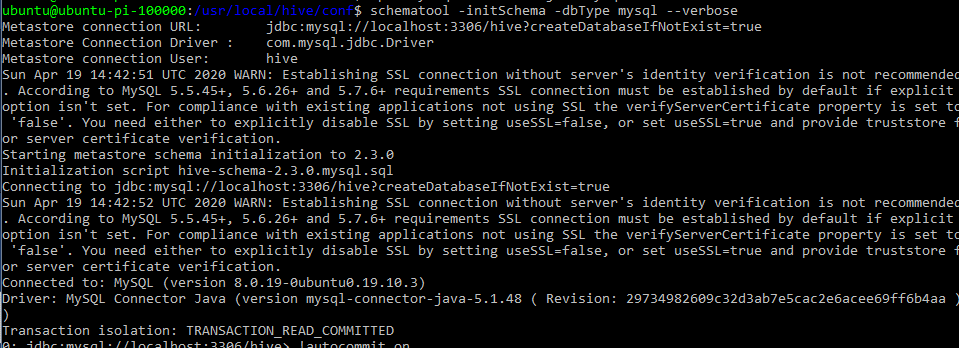
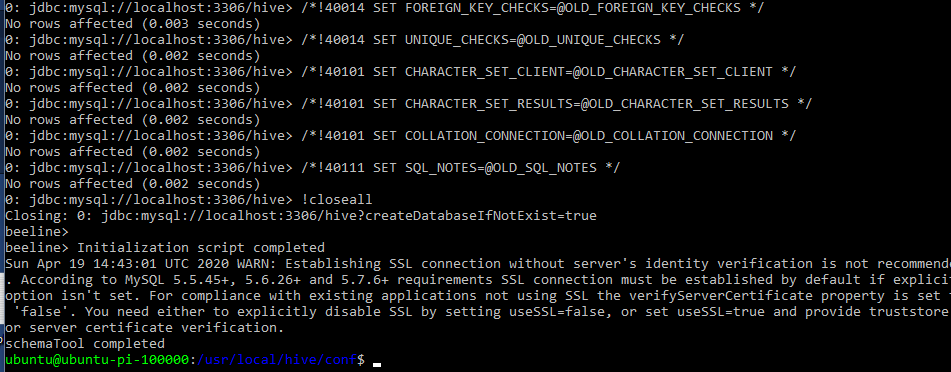
Initialize the mysql meta store:
schematool -initSchema -dbType mysql --verbose
Start Hive Metastore
hive --service metastore
#I had to leave hdfs safe mode
hdfs dfsadmin -safemode leave
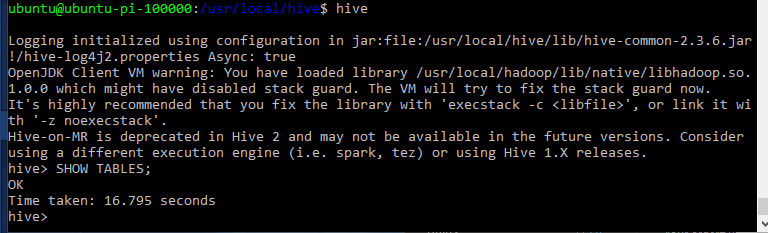
Start Hive
hive
Test Hive
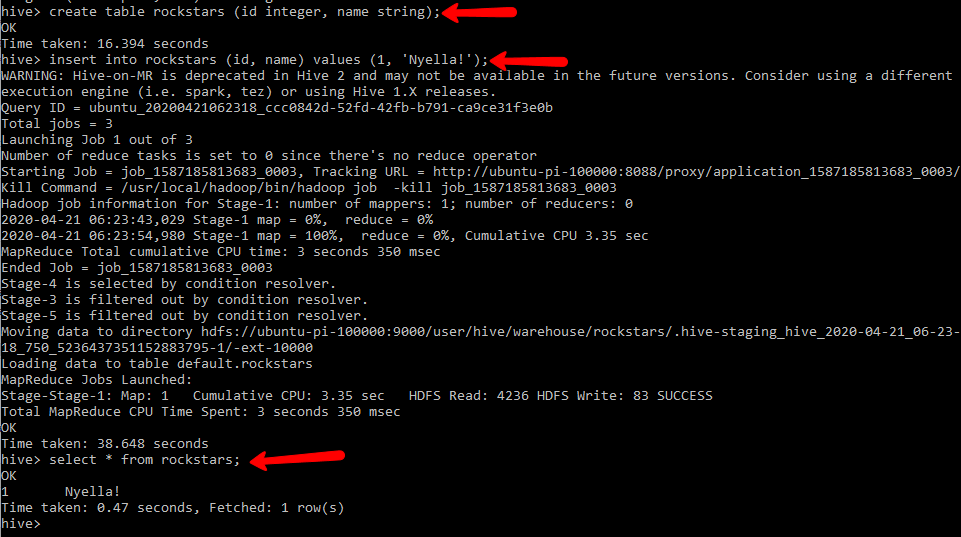
This simple insert will create a full on map reduce job. two actually. sele
create table rockstars (id integer, name string);
insert into rockstars (id, name) values (1, 'Nyella!');
select * from rockstars;
#Useful hive debugging commands:
hive -hiveconf hive.root.logger=DEBUG,console
Spark
Install Spark on all nodes of the cluster
download it:
wget https://downloads.apache.org/spark/spark-2.4.5/spark-2.4.5-bin-hadoop2.7.tgz -P ~/downloads
sudo tar zxvf ~/downloads/spark* -C /usr/local
sudo mv /usr/local/spark-* /usr/local/spark
sudo chown -R ubuntu /usr/local/spark
Configure our Master Spark Node: (also our namenode ubuntu-pi-100000)
update /spark/conf/spark-env.sh
cd /usr/local/spark
#copy the template file and make a new spark-env.sh
cp spark-env.sh.template spank-env.sh
nano spark-env.sh
add the SPARK_DIST_CLASSPATH variable
export SPARK_DIST_CLASSPATH=$HADOOP_HOME/etc/hadoop/*:$HADOOP_HOME/share/hadoop/common/lib/*:$HADOOP_HOME/share/hadoop/common/*:$HADOOP_HOME/share/hadoop/hdfs/*:$HADOOP_HOME/share/hadoop/hdfs/lib/*:$HADOOP_HOME/share/hadoop/hdfs/*:$HADOOP_HOME/share/hadoop/yarn/lib/*:$HADOOP_HOME/share/hadoop/yarn/*:$HADOOP_HOME/share/hadoop/mapreduce/lib/*:$HADOOP_HOME/share/hadoop/mapreduce/*:$HADOOP_HOME/share/hadoop/tools/lib/*
update the master nodes .bashrc file
#SPARK VARS
#spark and py spark variables - added by DR. 20200409
export SCALA_HOME=/usr/local/scala
export SPARK_HOME=/usr/local/spark
export PATH=$PATH:$SPARK_HOME/bin
export TERM=xterm-color
#here we're actually changing the pyspark working directory and configuring pyspark to use jupyter
export PYSPARK_DRIVER_PYTHON=jupyter
export PYSPARK_DRIVER_PYTHON_OPTS='notebook --ip ubuntu-pi-100000 --notebook-dir=/home/ubuntu/notebooks'
update master node slaves configuration file in /spark/conf/slaves
If the file isn't available, create it by copying the template file slaves.template
cp slaves.template slaves
remove 'localhost' from this file and add your servers:
#A Spark Worker will be started on each of the machines listed below.
ubuntu-pi-010000
ubuntu-pi-001000
ubuntu-pi-000100
ubuntu-pi-000010
ubuntu-pi-000001
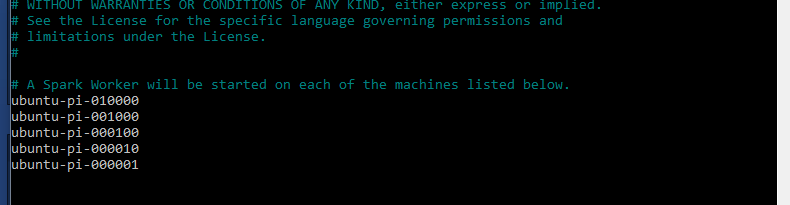
Start configuring our worker nodes by modifying the spark-env.sh
nano /usr/local/spark/conf/spark-env.sh
Add the environment variables to the file
export HADOOP_HOME=/usr/local/hadoop
export JAVA_HOME=/usr
export SPARK_DIST_CLASSPATH=$HADOOP_HOME/etc/hadoop/*:$HADOOP_HOME/share/hadoop/common/lib/*:$HADOOP_HOME/share/hadoop/common/*:$HADOOP_HOME/share/hadoop/hdfs/*:$HADOOP_HOME/share/hadoop/hdfs/lib/*:$HADOOP_HOME/share/hadoop/hdfs/*:$HADOOP_HOME/share/hadoop/yarn/lib/*:$HADOOP_HOME/share/hadoop/yarn/*:$HADOOP_HOME/share/hadoop/mapreduce/lib/*:$HADOOP_HOME/share/hadoop/mapreduce/*:$HADOOP_HOME/share/hadoop/tools/lib/*
Update ~/.bashrc with Spark Variables
#SPARK VARS
export SCALA_HOME=/usr/local/scala
export SPARK_HOME=/usr/local/spark
export PATH=$PATH:$SPARK_HOME/bin
export SPARK_CONF_DIR=/usr/local/spark/conf
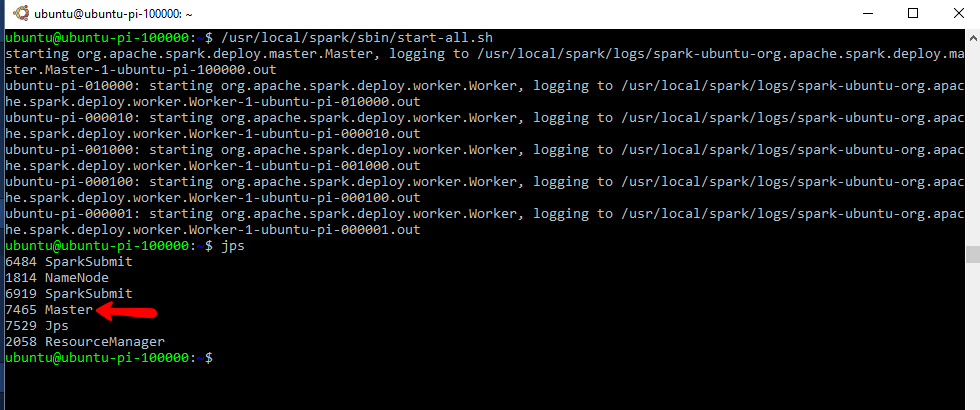
Start the spark cluster from your main node
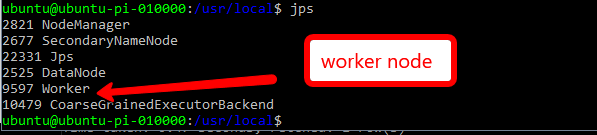
/usr/local/spark/sbin/start-all.sh
This will read the workers/slaves file and initialize the worker nodes as well.
Test Spark
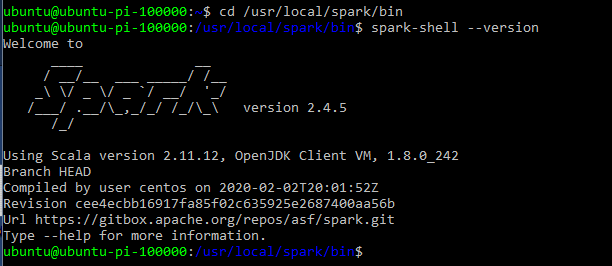
cd /usr/local/spark/bin
spark-shell --version
View the Spark UI : http://ubuntu-pi-100000:8080/
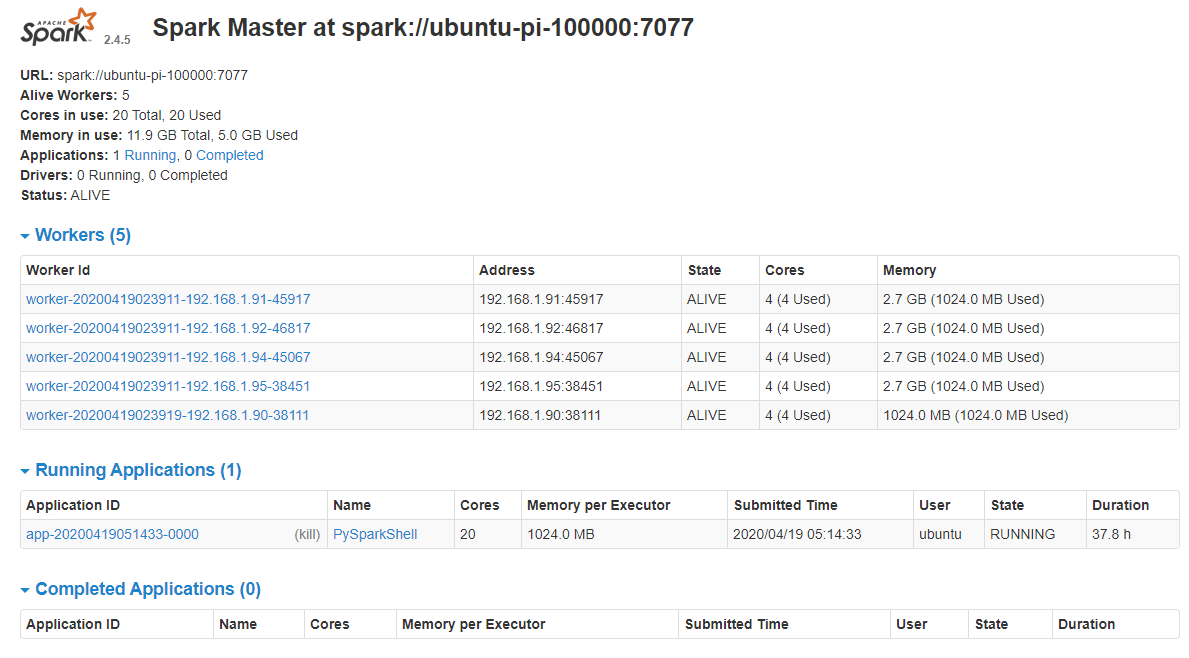
Pyspark:
Pyspark comes with Spark. We just need to ensure we have Jupyter notebooks available.
If you noticed , earlier in this post, I setup PYSPARK_DRIVER_PYTHON variables which will instruct pyspark to use jupyter instead of the shell when ran. This will spin up a notebook server and display the URL for accessing the server.
#Install Jupyter notebooks
sudo apt install python-pip
pip install jupyter
#start pyspark and specify the Spark master node url
/usr/local/spark/bin/pyspark --master spark://ubuntu-pi-100000:7077
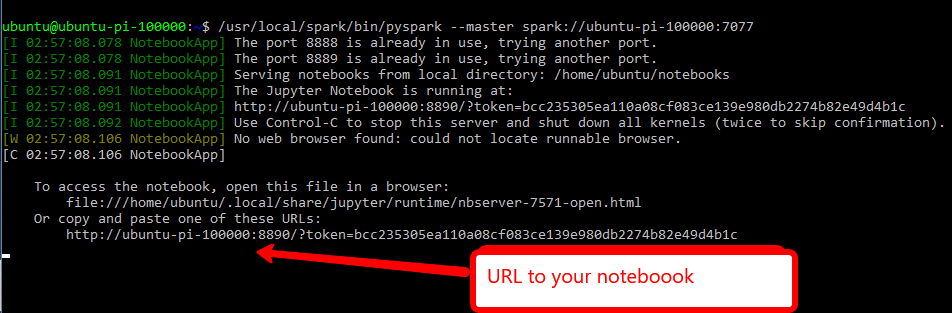
go to the URL
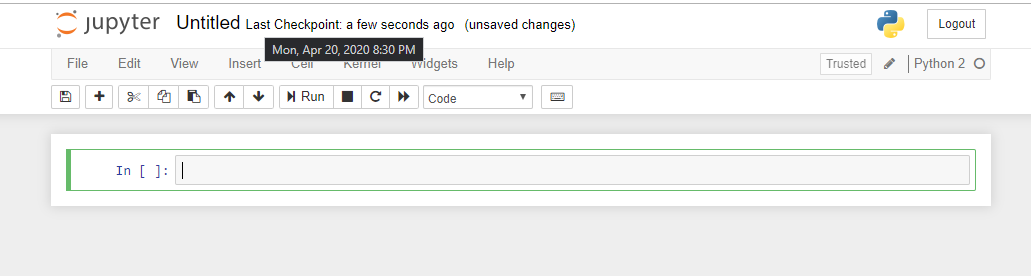
Helpful ish!
#Useful jupyter notebook commands: jupyter troubleshoot #in general jupyter notebook stopjupyter notebook list #useful spark commands: ./start-slave.sh ubuntu-pi-100000:7077
STARTING AND STOPPING HADOOP
1. ALL Services : start-all.sh & stop-all.sh: Available in the /usr/local/hadoop/sbin directory. Call "start-all.sh"
2. Yarn (Resource Manager) : stop-yarn.sh, start-yarn.sh Available in the /usr/local/hadoop/sbin directory.
3. HDFS (Datanode, NodeManager): stop-dfs.sh, start-dfs.sh Available in the /usr/local/hadoop/sbin directory.
Great references for default values and install instructions:
https://hadoop.apache.org/docs/r2.4.1/hadoop-yarn/hadoop-yarn-common/yarn-default.xml
https://hadoop.apache.org/docs/r2.4.1/hadoop-project-dist/hadoop-hdfs/hdfs-default.xml
https://hadoop.apache.org/docs/r2.10.0/hadoop-project-dist/hadoop-common/ClusterSetup.html
https://www.informit.com/articles/article.aspx?p=2190194&seqNum=2
https://spark.apache.org/docs/2.2.0/
https://www.linode.com/docs/databases/hadoop/how-to-install-and-set-up-hadoop-cluster/
🚀 Raspberry Pi Cluster Series Navigation
You are reading Part 3 of 3
Raspberry Pi Cluster - Part 3: Software and Configuration
Complete software setup guide for installing Hadoop, Spark, and cluster management tools on your Raspberry Pi cluster.